🖱️ Logitech MX Master 4 — Premium Productivity Mouse with Advanced Scrolling
The Logitech MX Master 4 continues the legacy of Logitech’s renowned MX Master lineup — a mouse designed not for gaming but for productivity, comfort, and efficiency during long work sessions. With upgrades like haptic feedback, ultra‑fast scrolling, and refined ergonomics, the MX Master 4 aims to be the go‑to tool for professionals, creatives, and power users who want more control and fluid navigation at their fingertips.
🧠 What Makes It Special? A Focus on Productivity
Unlike gaming mice that prioritize extremely high polling rates and quick twitch movements, the MX Master 4 is built for workflow optimization. Its design and features are centered around reducing repetitive actions, speeding up navigation through long documents, and giving you powerful shortcuts right under your thumb.
🤲 Ergonomic Design for Extended Use
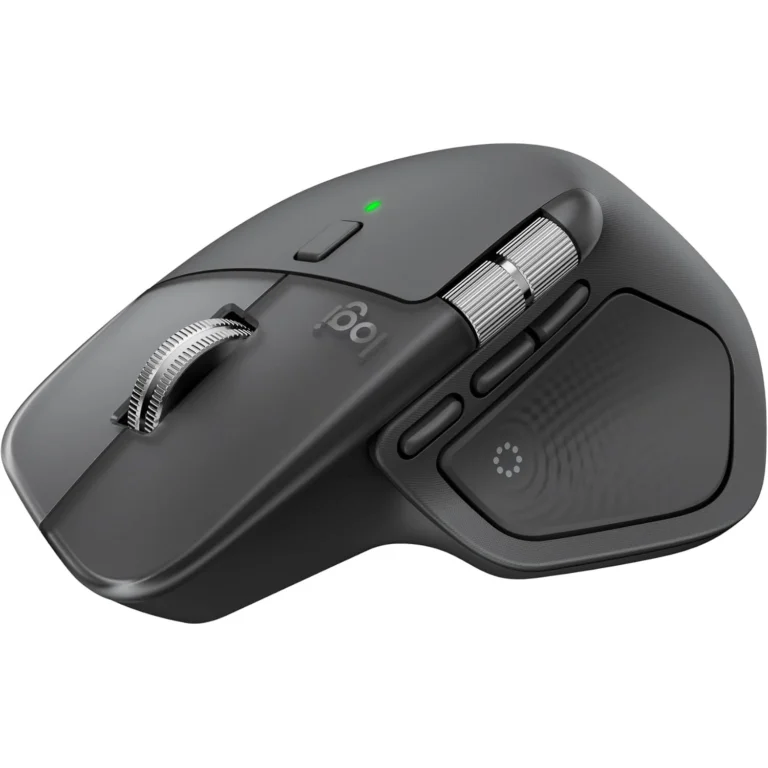
The MX Master 4 sports a contoured, right‑handed ergonomic shape that supports your hand naturally and reduces strain during extended use — ideal for long workdays or marathon editing sessions. The thumb rest, sculpted profile, and well‑placed buttons help reduce fatigue while encouraging precision and comfort.
At around 150 g, it’s heavier than gaming mice designed for flick‑based action, but that build makes it feel solid and reliable under your hand — perfect for productivity workflows.
⚙️ Advanced Scrolling — MagSpeed Wheel
One of the standout features of the MX Master 4 is Logitech’s MagSpeed electromagnetic scrolling wheel:
Ultra‑fast scrolling — capable of zipping through up to 1,000 lines per second, making long documents and spreadsheets effortless to navigate.
Dual‑mode — switch between precise ratcheted scrolling and free‑spin mode automatically based on how hard you flick the wheel.
A horizontal scroll wheel and thumb scroll wheel add extra dimension to navigating wide timelines, large sheets, and design tools.
Together, these make routine tasks feel smoother and more efficient — saving time and effort over hours of work.
🔔 Haptic Feedback & Action Ring
The MX Master 4 introduces haptic feedback, giving subtle vibrations to confirm actions, mode switches, or certain workflows. While optional and tunable via software, this tactile layer can help with awareness and efficiency.
In addition, a dedicated Action Ring button brings up a customizable radial menu on screen — letting you access shortcuts and tools at your cursor without hunting through menus. This can dramatically speed up repetitive tasks in creative and productivity software.
🧩 Buttons & Workflow Controls
The MX Master 4 includes an array of controls that go beyond standard clicks:
Primary left/right buttons with quiet, controlled action.
A gesture button to trigger app‑specific shortcuts when held and moved.
Horizontal and thumb‑wheel controls for added manipulation in large documents or design tools.
All of these can be remapped and customized using Logi Options+ software, which also lets you assign per‑app profiles, Smart Actions, and advanced shortcuts.
📡 Connectivity & Tracking
The MX Master 4 uses Logitech’s Darkfield high‑precision sensor (rated up to 8,000 DPI) that can track practically anywhere — even on glass or glossy surfaces — giving you flexibility no matter your workspace setup.
It connects wirelessly via Bluetooth or the Logi Bolt USB‑C receiver, providing 2× stronger wireless connectivity compared with older models — meaning fewer dropouts or signal issues.
🔋 Battery Life That Lasts Weeks
One of the MX Master 4’s biggest practical strengths is its battery life. Logitech claims up to 70 days of use on a single charge, even with features like haptic feedback enabled. That translates to rare charging sessions — ideal for heavy everyday use — and a convenient USB‑C charging port that can give you hours of use from just a minute of charging if needed.
💼 Price & Value (Pakistan & Global)
In Pakistan, the Logitech MX Master 4 typically ranges around PKR 30,000–50,000 depending on the retailer and stock availability.
Globally, it usually retails around $120–$140 USD, placing it squarely in the premium productivity mouse category — and reflective of its extensive set of features designed to improve work efficiency.
⚖️ Pros & Cons — For Productivity Users
👍 Strengths
Ergonomic design for extended comfort.
MagSpeed wheel with ultra‑fast and precise scrolling.
Customizable workflow tools like Action Ring and gestures.
Long battery life reduces charging hassle.
Strong tracking on almost any surface.
⚠ Areas to Consider
Lower polling rate (125 Hz) — fine for productivity but not for gaming performance.
Software needed to unlock full customization features.
Slightly heavier and larger than compact mice, which matters if you prefer ultralight options.
🏁 Final Verdict — Productivity Refined
The Logitech MX Master 4 isn’t about raw speed or FPS‑style performance — it’s about making your day easier, faster, and more fluid. With advanced scrolling tech, ergonomic comfort, workflow‑enhancing features like haptic feedback and Action Ring, plus exceptional battery life, it stands as one of the best productivity mice available today — especially for professionals, creators, and heavy computer users.